在你的模组中使用 DearOreUI
效果展示
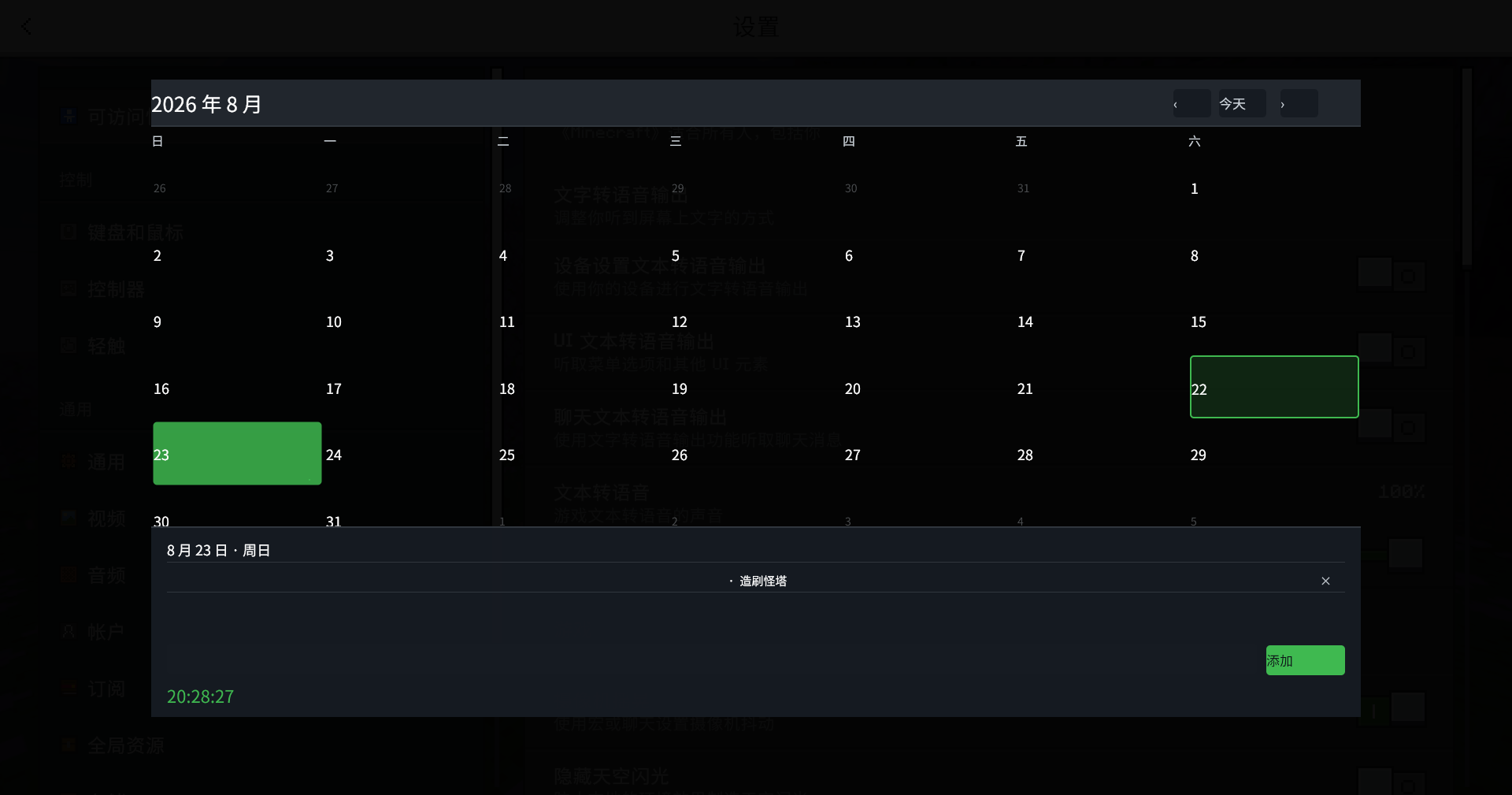
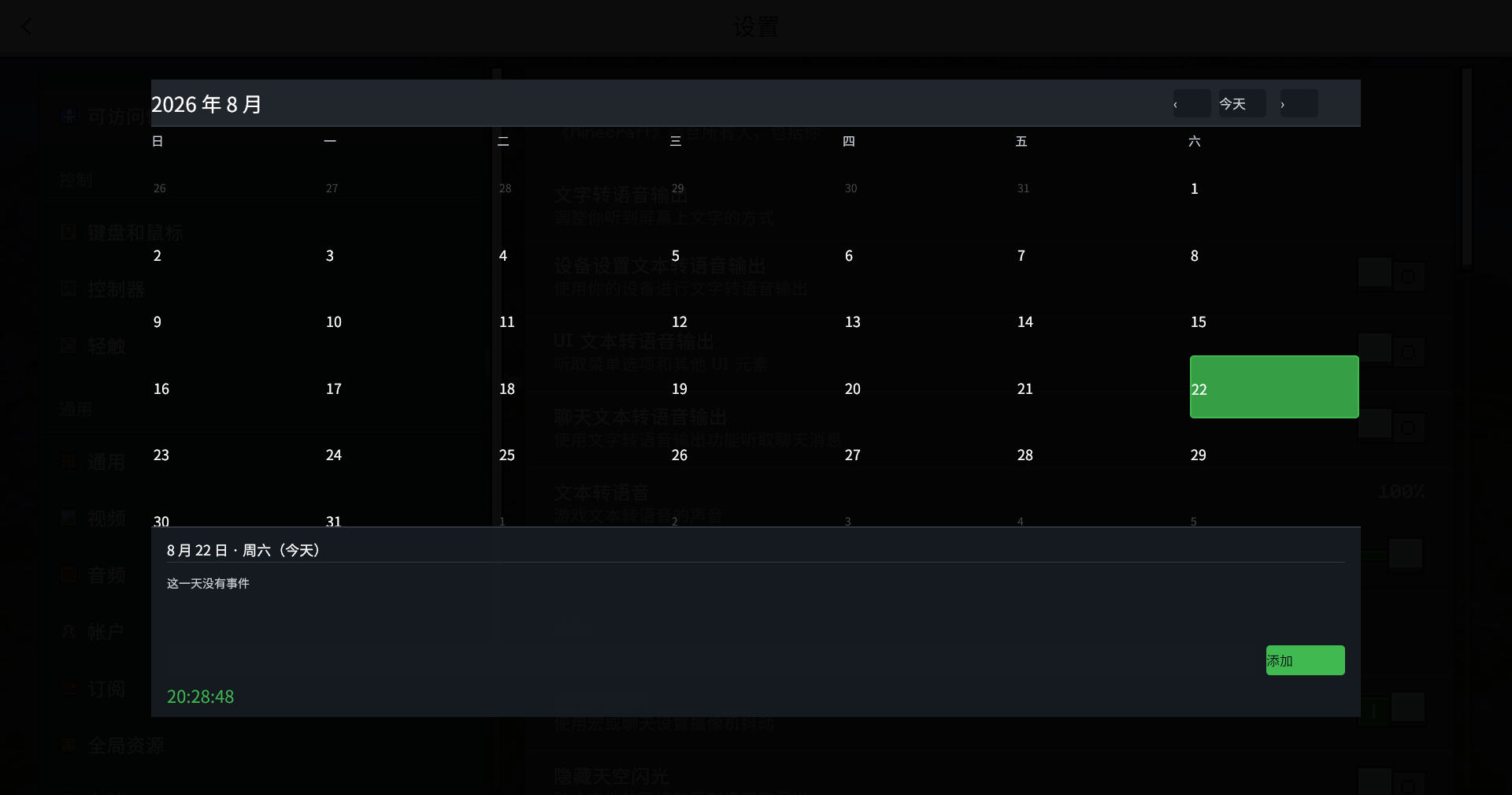
在这个教程中,你会逐步创建一个由 oreui 驱动的日历模组。
- 获取本次教程完整源代码
- 课程源码:
src/mod/examples/ - 默认课程:
04,完整日历 - 课程切换:
bin/my-mod/config.json
这个仓库有一个很实用的特点:01 到 04 不是四个互不相干的 Demo,而是一条逐步增加能力的路线。先连接运行时,再注册组件并注入页面脚本,然后打通 C++ 与页面的通信,最后组合成一个可以新增和删除事件的日历。
先看清楚:DearOreUI 负责什么
你的客户端 Mod 负责业务和注册,DearOreUI 负责把 UI 挂到 OreUI 页面里。
你的 Mod
  ├─ 获取 IDearOreUIApi*(走 C ABI 桥)
  ├─ registerMod()
  ├─ registerComponent() / registerHostMethod()
  ├─ publishEvent()
  └─ subscribePage() / subscribeFrame()
          │
          ▼
DearOreUI 运行时
  ├─ 监听页面生命周期
  ├─ 将组件和 DOM 注入页面
  ├─ 把事件送到页面脚本
  └─ 在页面销毁时通知 Mod
编译期头文件走自托管 xmake-repo,运行期走 C ABI 桥,无需链接。
示例模组并不链接一个 DearOreUI import library。MyMod::loadBridge() 用 GetModuleHandleW + GetProcAddress 查找 DearOreUI.dll 导出的 DearOreUI_QueryApi,拿到 IDearOreUIApi*。DearOreUI 对外只导出这一个 C 符号;其余 C++ 类型由公开头跨结构体 ABI 访问。这是项目验证通过的唯一集成方式,不要把它改写成文档里不存在的 runtime::IRuntime::api()。
前置条件
示例仓库当前的构建目标是 Windows x64 客户端:
| 项目 | 示例仓库中的实际配置 |
|---|---|
| 加载器 | LeviLamina 客户端 |
| 语言 | C++20 |
| 构建 | xmake |
| DearOreUI 头文件 | add_repositories + add_requires("dearoreui 0.1.2")(自托管 dearoreui-repo,header-only) |
| DearOreUI 运行时 | 游戏启动时必须已经加载 DearOreUI.dll |
| UI 页面 | OreUI 页面,例如世界列表;不是 JsonUI 页面 |
| 默认示例 | 04 |
| 页面脚本资产 | scripts/exNN_*.js(随构建拷贝到模组目录) |
xmake.lua 通过自托管 xmake-repo 声明式引入 DearOreUI 头文件:
add_repositories("levimc-repo https://github.com/LiteLDev/xmake-repo.git")
add_repositories("dearoreui-repo https://github.com/copper-lamp/dearoreui-repo.git")

add_requires("levilamina 26.10.*", {
    configs = { target_type = get_config("target_type") }
})
add_requires("dearoreui 0.1.2")

target("my-mod")
    add_packages("levilamina", "dearoreui")
DearOreUI 公开头以 header-only 形式打入 dearoreui-repo(git 地址 + commit-id 版本),不再发布头文件 zip 归档。需要升级公开头时,更新 add_requires 里的版本并刷新依赖:
xmake f --require=y
xmake build -y
tooth.json负责这个示例模组的 LeviLamina 打包配置,DearOreUI 本体自 v0.1.2 起支持 lip 一键安装。DearOreUI 是运行时前置条件,示例代码通过 DLL bridge 查找它;不要只安装示例模组而漏掉 DearOreUI 本体。
运行示例模组
克隆仓库后,先构建:
git clone https://github.com/magicobs0z/dearoreui-ExampleMod.git
cd dearoreui-ExampleMod
xmake build -y
构建产物位于 bin/my-mod/。部署时复制整个目录,而不是只复制 DLL,因为示例还读取:
bin/my-mod/config.json
bin/my-mod/manifest.json
bin/my-mod/my-mod.dll
bin/my-mod/scripts/ex02_script.js
bin/my-mod/scripts/ex03_communication.js
bin/my-mod/scripts/ex04_calendar.js
默认配置:
{
    "example": "04"
}
课程切换:
{ "example": "01" }
{ "example": "02" }
{ "example": "03" }
{ "example": "04" }
Mod 启动时,ExampleFactory 读取 config.json,只创建一个课程实例。空值、未知值和 04 都回退到完整日历。
课程路线:从连接到完整日历
| 课程 | 文件 | 学什么 | 成功日志 |
|---|---|---|---|
| 01 | ex01_hello_connection.h | C ABI 桥、注册 Mod、读取运行时信息 | [example.hello] connected: protocol=v1 ... |
| 02 | ex02_script.h | 组件树 ComponentSpec + 页面脚本资产(居中面板日历) | Example '02-component-script' is active. |
| 03 | ex03_communication.{h,cpp} | publishEvent + subscribeFrame + registerHostMethod(通信闭环) | [example.communication] communication example registered |
| 04 | ex04_calendar.{h,cpp} | 综合日历:居中面板、事件标记、host method、帧时钟 | [example.calendar] calendar demo registered |
建议按顺序看。直接跳到 04 也可以,但你会错过这个仓库为什么没有把所有东西都塞进一个组件树的原因。
第一步:注册 Mod 身份(01)
所有后续注册都要有一个已注册的 ModId。01 课程的核心代码很短:
dearoreui::api::ModManifest manifest;
manifest.id           = dearoreui::api::ModId{"example.hello"};
manifest.modNamespace = "example.hello";
manifest.displayName  = "Hello Connection Example";
manifest.modVersion   = dearoreui::api::Version{1, 0, 0};
manifest.permissions  = {};

auto result = mApi.registerMod(manifest);
if (result.isErr()) {
    logger.error("registerMod failed: {}", result.error().message);
    return false;
}

auto info     = mApi.getInfo();
auto protocol = mApi.getProtocolVersion();
auto ready    = mApi.isReady();
logger.info(
    "[example.hello] connected: protocol=v{} ready={} minecraft={} oreui={} coherent={}",
    protocol, ready, info.minecraftVersion, info.oreuiVersion, info.coherentVersion
);
01 没有任何 UI,它的”成功标志”只有日志。它教会你三件事:拿到 API 实例不靠链接、registerMod 是身份前置、isReady / getProtocolVersion 用来确认前置运行时活着且可用。
每个课程自己拥有一个命名空间,例如 mModId("example.hello")。课程结束时注销同一个 ModId:
static_cast<void>(mApi.unregisterMod(mModId));不要在一个课程里偷偷复用另一个课程的注册句柄。示例工厂一次只启用一个课程,这样切换配置不会留下上一课的 UI 和订阅。
第二步:组件树 + 页面脚本(02)
02 是第一个真正渲染 UI 的课程。它把两件事放在一起讲:声明式组件树和页面脚本注入。
组件树(ComponentSpec)
DearOreUI 的组件注册入口是:
auto result = mApi.registerComponent(mModId, uiManifest, componentSpec);02 用一个 Section 作为页面壳,正文放一个 <div id="cal-root"> 和一段页面脚本:
dearoreui::api::UiManifest uiManifest;
uiManifest.modNamespace  = mModId.value();
uiManifest.id            = "calendar_script";
uiManifest.kind          = dearoreui::api::UiKind::Overlay;
uiManifest.pageScopes    = {dearoreui::api::PageScope::Any};
uiManifest.anchor        = dearoreui::api::UiAnchor::TopRight;
uiManifest.pointerEvents = true;
uiManifest.containerId = dearoreui::api::makeUiContainerId(
    uiManifest.modNamespace, uiManifest.kind, uiManifest.id
);
uiManifest.fingerprint = "script.v1";

std::vector<dearoreui::api::DomNode> body;
body.push_back(dearoreui::api::DomNode{
    .tag   = "div",
    .attrs = {{"id", "cal-root"}},
    .style = "position:fixed;top:0;left:0;right:0;bottom:0;overflow:hidden;",
    .text  = "",
});
body.push_back(dearoreui::api::DomNode{
    .tag  = "script",
    .text = loadPageScriptAsset(mMod.getSelf().getModDir(), "ex02_script.js"),
});

dearoreui::api::ComponentSpec root;
root.kind = dearoreui::api::ComponentKind::Section;
root.body = std::move(body);这里有一个容易误会的地方:anchor = TopRight 是 DearOreUI 的挂载锚点,不等于你的页面内容必须永远挤在右上角。02 在本课程起就用居中面板:根的 cal-root 接管整个视口(position:fixed + top/left/right/bottom:0),页面脚本在里面画一个全屏半透明 backdrop 和居中的卡片式月历。小提示框用普通布局即可,只有页面型 UI 才需要接管整个 viewport。
全屏容器必须用
top/left/right/bottom:0,不要用100vw/100vh;后者在这个客户端会触发整棵树的布局重算。
为什么脚本走资产文件,而不是内联字符串
02 起,页面脚本从 scripts/ex02_script.js 由 C++ 侧 loadPageScriptAsset 读取,再经 <script> DomNode 注入。页面脚本是独立的 .js 资产而非内联 R"js()js" 常量,可以被 lint / 复用 / 像普通前端资产一样映射。引擎不能执行 DOM 里的 <script src> 外链节点,所以这里在 C++ 侧读文件内容、走验证过的 <script> 内联注入通道。
在这个客户端上,不要把页面脚本交给不确定的 eval()、普通绑定通道或另一个未经验证的执行路径。脚本必须在页面节点挂载后运行,02 的 boot() 会轮询 cal-root 和 window.oreui:
var tries = 0;
function boot() {
    tries++;
    var root = document.getElementById('cal-root');
    if (!root || !window.oreui) {
        if (tries < 60) setTimeout(boot, 50);
        return;
    }
    build(root);
    render();
}
boot();
第三步:通信闭环(03)
03 在 02 的居中面板月历之上,把 C++ 和页面之间的三个通信机制串成闭环:
- C++ → JS:
publishEvent。页面 Ready 后用 Ready 回调里保存的上下文推送种子事件:
void Ex03Communication::onPageReady(dearoreui::api::PageContextView const& view) {
    mContextId = view.id;

    dearoreui::api::EventPublishOptions seed;
    seed.owner   = mModId;
    seed.context = view.id;
    seed.name    = "calendar.events";
    seed.payload = seedEventsJson();
    auto r = mApi.publishEvent(seed);
    // 失败则记 error 日志,不要崩
}
JS 订阅同一个事件名:
window.oreui.event.on('calendar.events', function (payload) {
    if (payload && payload.events) state.events = payload.events;
    render();
});- C++ → JS:帧驱动时钟。03 没有用 JS
setInterval作为游戏数据源,而是订阅 DearOreUI 的 frame service,每 30 帧检查一次、按秒去重,推送calendar.clock:
auto handle = mApi.subscribeFrame(
    dearoreui::api::FrameSubscriptionOptions{mModId},
    [this]() { onFrame(); }
);
calendar.clock payload 长这样:
{ "y": 2026, "m": 8, "d": 22, "h": 20, "mi": 19, "s": 3 }帧服务是这个客户端里唯一可靠的周期源。跨午夜时今天标记要自动更新,但用户手动选择日期时,时钟不能把详情切走。
- JS → C++:
registerHostMethod。03 注册calendar.init,服务端实现IHostMethod:
class CommunicationInitMethod final : public dearoreui::api::IHostMethod {
public:
    std::string name() const override { return "calendar.init"; }
    dearoreui::api::Permission requiredPermission() const override {
        return dearoreui::api::Permission::HostReadOnly;
    }
    dearoreui::api::Result<std::string> execute(
        dearoreui::api::ContextId, std::string_view
    ) override {
        return dearoreui::api::Result<std::string>::success(mOwner.handleInit());
    }
};
页面端调用一次拉取权威数据:
window.oreui.host.call('calendar.init', { want: ['today', 'events'] })
    .then(function (res) {
        // 用返回的会话快照刷新页面
});这里有一个项目验证出的硬限制:一个页面的 dispatch 通道在一次业务派发后即占满,不允许同页第二次 JS→C++ 调用。所以 03 只演示一次 calendar.init 调用;不要为了”看起来双向完整”再偷偷加第二次 dispatch。先想清楚权限、页面范围和错误处理。
事件 payload 要在 C++ 和 JS 两端保持同一个契约。03 的种子数据形状是:
{
  "events": {
    "2026-08-22": ["今日计划", "示例事件"],
    "2026-08-23": ["午休 12:00", "提交周报"],
    "2026-08-24": ["周末活动"]
  }
}
示例没有把每次本地新增都发回 C++。本地事件保存在当前页面脚本的内存里,页面销毁后消失。需要持久化时,再设计 Host method 或资源/配置存储,不要默认把 JS 内存当成存档。
第四步:完整日历(04,默认)
04 是这个仓库的毕业作品,也是默认课程。它把 01~03 的全部能力组合成一个精美的居中面板月历:
- 全屏半透明 backdrop + 居中卡片,现代设计,任何分辨率都可读;
- 月历网格:翻页 / 今天描边 / 点选日期,点击用真实 DOM
addEventListener委托; - C++→JS 推送:页面 Ready 推种子事件 + 帧驱动时钟;
- 事件圆点 + 详情列表,本地增删(JS 侧 store);
- 注册
calendar.inithost method(facet 单 dispatch)。
shutdown() 按相反方向注销帧订阅、页面订阅、Host method、UI 和 Mod:
void Ex04Calendar::shutdown() {
    if (mFrameSub.has_value())      { mApi.unsubscribeFrame(*mFrameSub); mFrameSub.reset(); }
    if (mDestroyedSub.has_value())  { mApi.unsubscribePage(*mDestroyedSub); mDestroyedSub.reset(); }
    if (mReadySub.has_value())      { mApi.unsubscribePage(*mReadySub); mReadySub.reset(); }
    if (mHostMethodHandle.has_value()) { mApi.unregisterHostMethod(*mHostMethodHandle); mHostMethodHandle.reset(); }
    if (mUiHandle.has_value())      { mApi.unregisterUi(*mUiHandle); mUiHandle.reset(); }
    static_cast<void>(mApi.unregisterMod(mModId));
}
这个顺序很重要:页面监听和帧回调不能在 UI 或 Mod 已经注销后继续运行。Destroyed 回调里同样要清除上下文、停止帧订阅。
字体、颜色与布局:示例中真正验证过的结论
中文字体
04 使用这组字体栈:
font-family: 'Microsoft YaHei', 'SimHei', 'Noto Sans SC',
             'Noto Sans', 'Segoe UI', sans-serif;
Windows 客户端上中文已经可以正常显示,但这是字体栈匹配结果,不等于所有机器都一定使用同一个字体。若要做可移植字体资源,应另外验证 ResourceKind::Font、资源 URI 和页面字体加载链路;示例仓库没有假装这条链路已经完成。组件静态 label 不要直接用中文——本次真机验证发现,主题字体对静态 CJK label 的支持并不稳定。
颜色
04 最终只使用四组颜色:
白色    #ffffff
淡灰色  #d0d7de
深灰色  #161b22 / #21262d / #30363d
绿色    #3fb950
蓝色、红色和渐变在最终版本中已经移除。删除符号使用淡灰,今天、选中状态和事件标记使用绿色。
布局
CSS Grid 和 gap 在网格重建时会错位,vw/vh 会触发全量布局重算,所以 04 的日历页采用居中面板 + 显式像素几何:
// 全屏 backdrop 接管视口
bd.style.cssText = 'position:absolute;top:0;left:0;right:0;bottom:0;background:rgba(0,0,0,0.5);';
// 面板用显式 left/top/width/height,不用 flex-grow 撑满
p.style.cssText = 'position:absolute;left:'+lx+'px;top:'+ly+'px;width:'+pw+'px;height:'+ph+'px;'
+ 'display:flex;flex-direction:column;box-sizing:border-box;...;';库区网格只构建一次、原地更新,不在渲染时整棵重建子树。这看起来不如 Grid 简洁,但在这个运行环境里更可控。页面教程应该记录真机结果,而不是把理想中的 CSS 能力写成已验证事实。
验证和排查
先看日志
示例会输出类似:
Connected to DearOreUI, protocol 1
Example '04-calendar-demo' is active.
01 会额外打印:
[example.hello] connected: protocol=v1 ready=true minecraft=... oreui=... coherent=...再看配置
如果始终看到 04,检查实际加载目录中的 config.json,不要只修改源码目录里的同名文件。MyMod::connectDearOreUI() 读取的是:
getSelf().getModDir() / "config.json"常见现象
| 现象 | 先检查什么 |
|---|---|
| 没有连接日志 | DearOreUI.dll 是否已经加载,bridge 导出 DearOreUI_QueryApi 是否存在 |
| 注册失败 | ModId、命名空间、页面范围和权限是否正确 |
| 页面完全不显示 | 当前页面是否是 OreUI 页面,boot() 是否找到 cal-root |
cal-root 没接管视口 | 是否用了 100vw/100vh,而没改用 top/left/right/bottom:0 |
| 网格错位 | 是否在渲染时重建了网格子树,而没原地更新格子 |
| 中文变成方块 | 页面字体栈是否命中,组件静态 label 是否直接使用了中文 |
| 点击日期无反应 | 是否使用真实 DOM addEventListener 委托,点击落点是否冒泡到日期节点 |
| 时间改变选中日期 | 不要让 calendar.clock 无条件覆盖 state.selected |
| 页面退出后仍有回调 | Destroyed 和 shutdown() 是否取消了帧/页面订阅 |
| 第二次 host 调用失败 | 单 dispatch 限制:一个页面只允许一次 JS→C++ 业务派发 |
真机检查清单
进入一个已知的 OreUI 页面后检查:
- 标题、日期、事件文本是否居中;
- 日历卡片是否在四边保留约 10% 空间;
- 日期是否始终是 7 列 × 6 行;
- 当前日期和手动选择日期是否没有互相覆盖;
- 添加事件后刷新当前日期是否出现事件标记;
- 删除事件后列表和标记是否一起消失;
- 页面切换或退出时日志是否没有继续刷回调。
资源、脚本和 CSS:不要把未验证接口当成现成答案
DearOreUI 的 API 确实提供资源、脚本和样式注册接口:
mApi.registerResource(owner, resourceManifest, payload);
mApi.registerScript(owner, scriptManifest, source);
mApi.registerStyleSheet(owner, styleManifest, source);
具体字段以当前 DearOreUI/src/api/manifest/ 头文件为准。字体资源尤其需要在目标客户端验证字体二进制、资源 URI 和 @font-face 是否完整打通。示例日历因此使用系统字体栈,而不是在仓库里声称已经注册了一套中文字体。
同样,示例中的动态脚本走「资产文件 → loadPageScriptAsset → <script> DomNode」这条已经在客户端走通的路径,而不是文档里凭空捏造一个 registerPageScript() API。
关于安全校验(v0.1.2 起):所有外部 htmlBody 在注册时即经过 fail-closed 安全校验。拒绝 <script> / <iframe> / <object>、on* 事件属性、javascript: / file: / http: / data: URL,以及越界的 oreui:// 路径。页面动态行为请交给页面脚本 + oreui.event.on,不要依赖内联脚本。
生命周期注销模板
示例课程的 shutdown() 大致遵循这个顺序:
unsubscribeFrame();
unsubscribePage(Destroyed);
unsubscribePage(Ready);
unregisterHostMethod();
unregisterUi();
unregisterMod();
每一步都用保存的 RegistrationHandle,并在注销后 reset 对应的 optional。unregisterMod() 不能代替你在页面仍活跃时停止回调;显式取消订阅仍然要做。
继续阅读
如果你要从自己的 Mod 开始,建议先复制示例的 01 课程,确认 bridge 和 registerMod() 正常,再一步步加 UI。不要直接从 04 的完整脚本开始抄;04 里有不少代码是为了适应这个特定客户端的页面布局限制。